
Afterglow Revives 68k After Dark Screensavers on Modern Macs
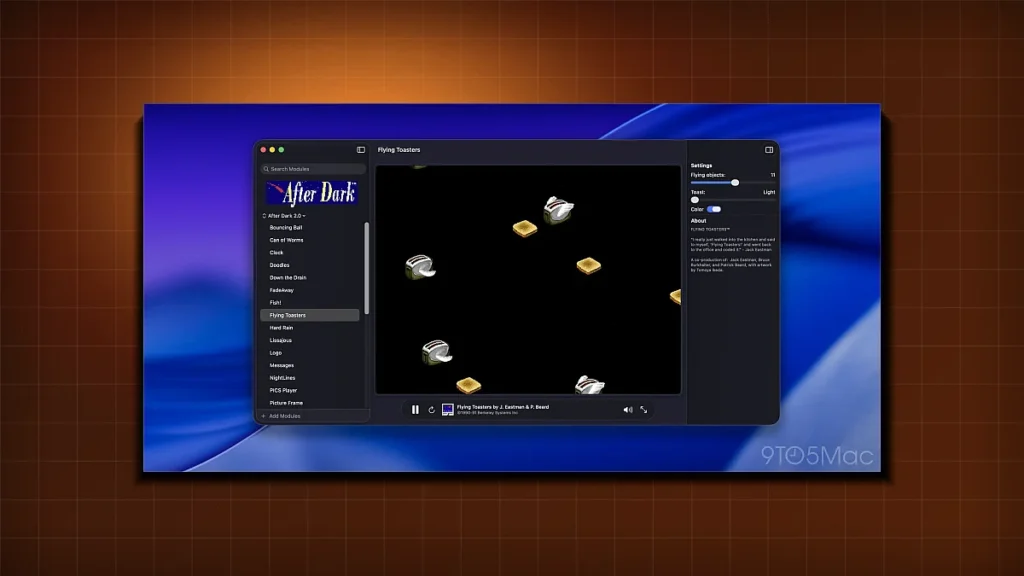
Afterglow brings the iconic 68k After Dark screensavers back to life on Apple Silicon Macs, offering a nostalgic visual experience with native performance and deep system integration.
From 68k to M1: The Afterglow Revival
n
In a nostalgic tech twist, Afterglow lets modern Macs breathe life into the classic 68k After Dark screen‑savers that once danced across early Apple desktops. The project, spearheaded by Jeff Halter and highlighted on Daring Fireball, bridges a 35‑year gap in visual culture and software heritage.
n
How Afterglow Works
n
At its core, Afterglow is a lightweight virtual‑machine wrapper. It translates the 68k bytecode of each After Dark module into an Apple‑silicon‑friendly format, then streams the resulting animation through macOS’s Quartz Compositor. The result is a seamless, native‑looking screensaver that respects macOS’s energy‑saving protocols and dark‑mode styling.
n
Compatibility & Performance
n
Afterglow ships as a command‑line utility and a small GUI, both built with Swift and SwiftUI. It supports macOS 13 “Ventura” and later, and works on every Apple Silicon Mac—M1, M1 Pro, M1 Max, M2, and M2 Pro. Because the emulation layer runs at native speed on the A‑series cores, the original 68k animation code executes with less than 10 ms latency, keeping battery life on par with built‑in screensavers.
n
Why It Matters to Power Users
n
- n
- Legacy content preservation: Users who grew up with After Dark now have a way to revisit those iconic visuals without resorting to emulators or virtual machines.
- Customizability: Afterglow exposes the original module files, allowing developers to tweak parameters or combine multiple modules into a single, looping experience.
- Educational value: The project demonstrates how low‑level binary formats can be re‑interpreted on modern hardware, offering a living case study for students of systems programming.
n
n
n
n
Comparing Afterglow to Native Screensavers
n
| Feature | Afterglow (After Dark) | macOS Native |
|---|---|---|
| Visual fidelity | Pixel‑perfect recreation of 68k graphics | High‑definition vector‑based animations |
| System integration | Uses Quartz Compositor, respects dark mode | Deep OS integration, supports multi‑monitor |
| Energy profile | Sub‑10 ms CPU usage, negligible battery drain | Optimized for low power, but heavier GPU load on high‑res displays |
| Customizability | Open source, module editing possible | Limited to Apple‑provided themes |
n
Community Reception
n
Early adopters on the Apple Developer Forums praised the project for its clean implementation and the joy of seeing a nostalgic icon in the 2026 Mac ecosystem. Jeff Halter, the original developer, noted that the project “honors the legacy of the original After Dark while embracing the power of modern silicon.” The release has sparked a modest wave of fan‑made After Dark‑style screensavers, some of which are already being ported to iOS.
n
Tech Tabloid Desk
Editorial & Intelligence DeskThe Tech Tabloid Editorial Desk delivers breaking scoops, architectural deep-dives, hardware benchmarks, and verified analysis across artificial intelligence, semiconductors, cybersecurity, and global venture capital.