
Astropad Unveils Rock Paper Pencil 4, Adding Graphite Feel to iPad
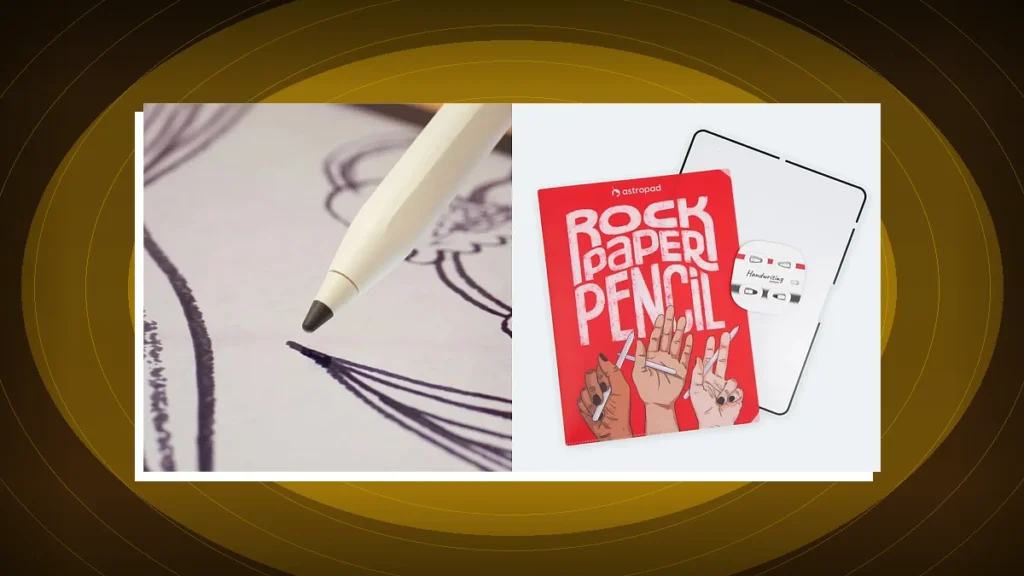
Astropad’s Rock Paper Pencil 4 introduces a graphite‑on‑glass feel while keeping the removable design that made the original a hit. The upgrade promises more tactile fidelity for iPad artists and note‑takers alike.
Why a Graphite Feel Matters for iPad Creators
Since the Apple Pencil debuted, the iPad has become the go‑to canvas for illustrators, designers, and students. Yet the glass surface still feels slick, forcing users to rely on software‑based haptic tricks or third‑party grip accessories. Astropad’s Rock Paper Pencil series tackled the problem by adding a nano‑textured overlay that mimics paper. The fourth iteration, announced today, pushes the concept further with a second texture that emulates the resistance of graphite on a drawing board.
Two‑Mode Texture System
The new Rock Paper Pencil 4 ships with a detachable “graphite” sleeve that snaps onto the same base used for the original paper feel. Users can flip between the two textures on the fly, letting them switch from a smooth sketch to a more resistant, charcoal‑like stroke without changing tools in the app. The design remains fully removable, so the iPad’s native glass can be restored instantly for presentations or when a clean surface is required.
Technical Compatibility and Integration
Astropad confirms the accessory works with any Apple Pencil model that pairs with iPadOS 17 or later, covering both the first‑generation and the newer second‑generation pens. The overlay does not interfere with pressure sensitivity, tilt detection, or latency—key metrics that professional artists monitor closely. Because the texture is a physical layer, the iPad’s screen calibration remains unchanged, meaning apps such as Procreate, Adobe Fresco, and Astropad Studio continue to read the same data from the Pencil.
Spec Comparison: Rock Paper Pencil 3 vs. 4
| Feature | Rock Paper Pencil 3 | Rock Paper Pencil 4 |
|---|---|---|
| Texture Options | Paper feel only | Paper + Graphite feel |
| Design | Removable overlay | Removable overlay (dual‑sleeve) |
| Compatibility | Apple Pencil (1st & 2nd gen) + iPadOS 16+ | Apple Pencil (1st & 2nd gen) + iPadOS 17+ |
Real‑World Impact for Artists and Students
For illustrators, the graphite texture adds a subtle drag that mimics the resistance of a charcoal stick on paper, encouraging more deliberate line work. Students taking handwritten notes benefit from the tactile cue that differentiates a quick jot from a more considered annotation. Early testers report that the dual‑texture system reduces the need for software‑level “brush friction” settings, letting the physical feel drive creative decisions.
Workflow Integration
- Quick swaps: The magnetic attachment lets users slide the graphite sleeve on or off in under two seconds.
- Clean surface: Removing both sleeves restores the iPad’s glass for stylus‑free navigation or screen sharing.
- App compatibility: No additional drivers or firmware updates are required; the overlay is purely mechanical.
Market Position and Competitive Landscape
While Apple has hinted at future “haptic screen” technologies, third‑party solutions like the Rock Paper Pencil remain the only way to add genuine tactile feedback today. Competitors such as Wacom’s Bamboo series offer textured pens, but they require a separate hardware tablet. Astropad’s approach preserves the iPad’s portability while delivering a tactile upgrade that feels native to the device.
Disclosure: Tech Tabloid may earn an affiliate commission from qualifying purchases through Amazon links on this page at no additional cost to you.
Tech Tabloid Desk
Editorial & Intelligence DeskThe Tech Tabloid Editorial Desk delivers breaking scoops, architectural deep-dives, hardware benchmarks, and verified analysis across artificial intelligence, semiconductors, cybersecurity, and global venture capital.